4 October 2026 · 21 min read
10 Podcast Video Maker Tools for Shareable Clips
Compare 10 podcast video maker tools for waveforms, guest framing, captions, and aspect-ratio exports, with workflows and practical trade-offs.
A long podcast episode can be valuable long after the recording ends, but only if someone turns it into usable social content. The usual workflow is familiar: scrub through an interview, mark a few promising moments, crop the speakers for vertical video, fix captions, then export separate versions for vertical, square, and widescreen feeds.
A useful podcast video maker has to do more than display a waveform or place an audiogram over a static image. It should help you find a self-contained moment, preserve the meaning of the conversation, frame the right speaker, produce readable captions, and reduce repetitive work across formats. Final review still matters because automated selections can miss context or cut too close to a sentence boundary.
Video podcast creation is no longer a fringe workflow. Industry reporting on a 2025 creator study found that roughly 71% of podcasters incorporated video in some form, including video-only and multi-format publishing. That makes the production question practical rather than theoretical.
This comparison focuses on the actual podcast-to-social pipeline. The strongest tool depends on whether you value automated discovery, transcript editing, audiograms, speaker framing, publishing, or deeper creative control.
Table of Contents
- 1. Keptbits
- 2. Descript
- 3. Riverside Magic Clips
- 4. Headliner
- 5. VEED
- 6. Kapwing
- 7. Opus Clip
- 8. Munch Studio
- 9. Wavve
- 10. Wisecut
- Top 10 Podcast Video Makers, Feature Comparison
- Choose the Workflow That Matches Your Publishing Load
1. Keptbits
For a 90-minute, two-host interview, select the 12-minute range containing the guest's story, choose talking mode, then compare the top three scored moments for a clear opening line. Export the strongest cut for vertical and square feeds, then review the first and last sentence before publishing.
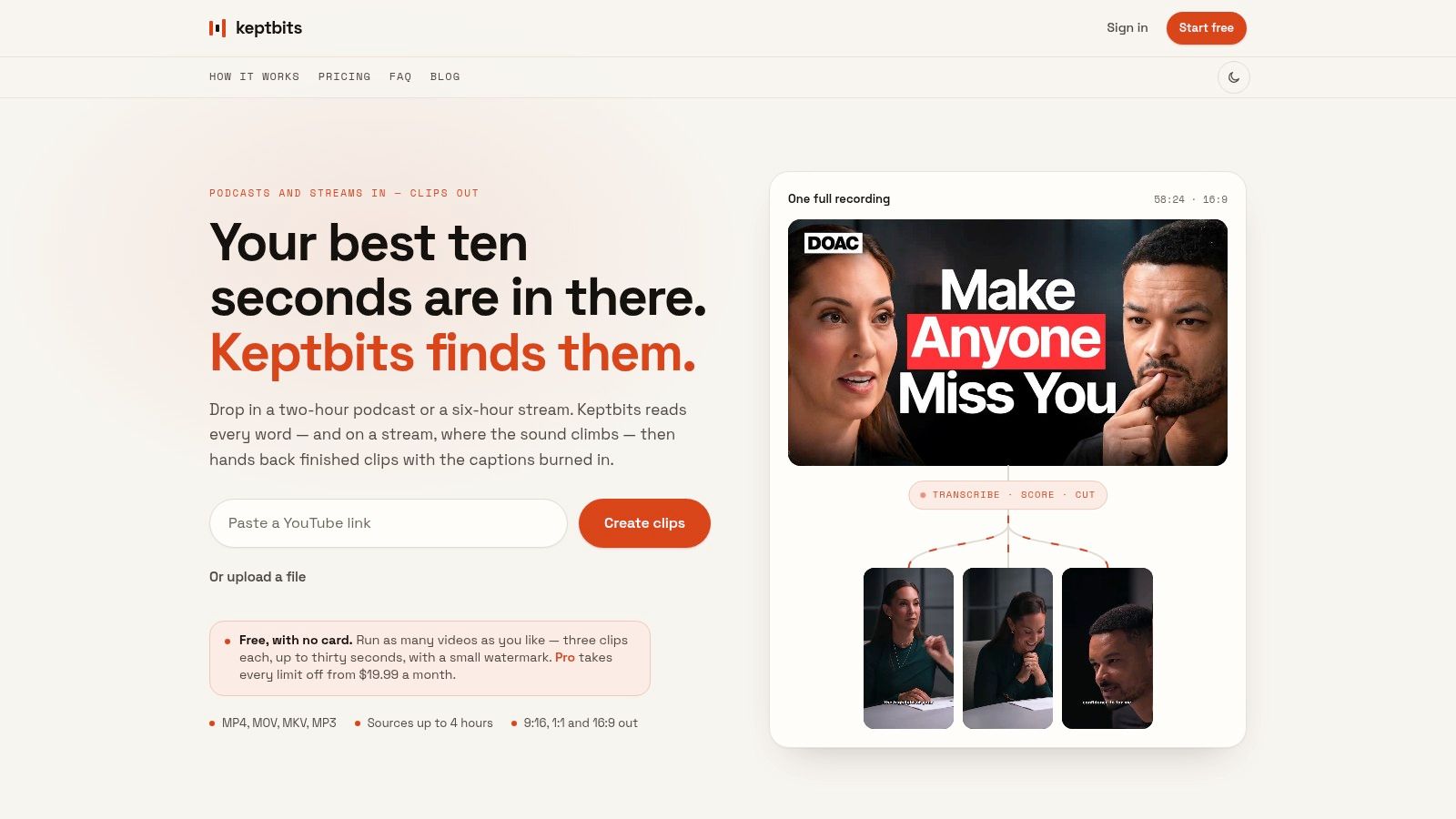
Keptbits focuses on the editorial bottleneck in podcast repurposing: finding a clip that stands on its own. Upload a long recording or paste a link, and the browser-based tool analyzes the conversation at transcript level rather than relying only on keyword matches. Its word-level transcription separates speakers, while candidate moments receive a narrative completeness score.
That scoring helps identify a complete thought, but it does not remove the need for review. Check whether the guest's point has enough context, whether the opening makes sense to someone unfamiliar with the episode, and whether the ending preserves the payoff. Cut boundaries follow word timings and sentence starts, reducing awkward edits that begin halfway through a statement.
The workflow accepts MP4, MOV, MKV, and MP3 files up to four hours, according to the Keptbits podcast video maker. It creates 9:16, 1:1, and 16:9 versions, reframes around the active speaker, and burns in captions. Speaker-aware cropping is useful in two-person interviews because the frame can follow the current speaker instead of remaining fixed on one host.
Where Keptbits fits best
The free plan provides unlimited runs and up to three clips per run, with clips limited to 30 seconds, a small watermark, and the Bold Pop caption style. Pro extends clips to three minutes and adds all 20 caption styles, silence removal, transitions, color grading, and an in-app editor. The supplied pricing lists Pro at $19.99 per month or $5.99 per week, with the first week free. These plan details are available on the Keptbits product page.
Practical rule: Judge the first draft by whether a viewer who has never heard the episode can understand the point without extra explanation.
Keptbits is not a full non-linear editor, scheduler, or mobile publishing suite. It fits teams whose main bottleneck is discovery and initial finishing, rather than multi-track production. The flat usage model also supports repeated testing with a representative episode before adopting a recurring workflow.
2. Descript
Descript is strongest when the producer wants to edit the conversation itself through text. Import a recording, let the platform transcribe it, and remove words or passages from the transcript to make corresponding changes to the audio and video. For dialogue-heavy podcasts, that can be faster than dragging clips around a timeline.
The workflow also handles filler-word removal, speaker detection, captions, remote recording, screen recording, and Studio Sound cleanup. Paid plans support watermark-free exports, and the platform supports exports up to 4K, as described in the Descript pricing information. That makes it a credible choice for teams that want one workspace for recording, cleanup, transcript editing, and social cutdowns.
The trade-off with transcript-led editing
Descript gives you strong control over what was said, but it isn't primarily an automated moment-ranking system. You may still need to search the transcript, identify the complete thought, and decide where the clip should begin and end. That extra editorial involvement is useful for a host who knows the episode well, but less convenient for a social manager processing a large archive.
Transcription hours and plan allowances require attention, especially when workloads spike. Users can also encounter pricing or credit friction if the team treats the platform as an unlimited production queue. Before choosing it, test a full episode and verify how much transcription capacity your actual schedule consumes.
If your main problem is caption cleanup after the edit, a dedicated AI subtitle maker guide can help you compare that narrower workflow. Descript remains the better fit when transcript-level editing and audio enhancement matter more than hands-off clip discovery.
3. Riverside Magic Clips
Riverside's Magic Clips makes the most sense when Riverside is already where the show is recorded. It keeps capture, editing, branding, and highlight generation in one environment, so the producer doesn't need to move a finished interview through several separate services before creating social assets.
The AI tool identifies highlight moments from full recordings and produces captioned clips with layouts. It can adjust clip duration, speaker focus, keywords, and aspect ratios, which gives the producer some control after the initial suggestions. Riverside describes the workflow through its recording and content creation platform.
Best for Riverside-native teams
The main advantage is continuity. A remote interview recorded in Riverside can move directly into a clip workflow without a separate upload or transcription handoff. That saves operational friction for teams that already use Riverside's brand presets and editor.
The limitation is editorial precision. Automated suggestions can be useful for interview-style conversations, but a producer may still want to rewrite the opening, extend the setup, or move the ending so the clip resolves properly. Results also vary with conversation structure. A direct question-and-answer exchange is easier to extract than a discussion where the key point depends on several earlier comments.
Riverside is a sensible choice for a recording-first team that wants convenience and a connected workspace. It isn't the best fit for someone evaluating tools solely by transcript-aware boundaries or who wants to compare several independent clipping systems without adopting the broader recording ecosystem.
4. Headliner
Headliner has deep roots in podcast promotion, and that background shows in its emphasis on audiograms, captions, episode artwork, and repeatable promotional assets. It works well for a producer who wants to turn a podcast episode into several shareable moments without building a complex editing project from scratch.
The platform can automatically identify up to 10 moments from long videos, according to the Headliner product site. It also includes an audiogram maker, caption styling, podcast promotion workflows, and YouTube-oriented tools. That makes it particularly approachable for shows that still rely heavily on audio but want more visual presence in social feeds.
A practical use case
Headliner is useful when consistency matters more than cinematic editing. A show can apply a recognizable visual treatment, generate captioned excerpts, and package episode promotion without asking every producer to become a video editor. Its free video tools also make initial testing relatively accessible.
The limitation is depth. Advanced timeline work, detailed speaker reframing, and complex visual composition are not its central strengths. A clip may look polished enough for promotion, but a team seeking precise narrative selection or extensive post-production could outgrow the workflow.
Choose Headliner for fast podcast promo production, especially when audiograms remain part of the content mix. Choose a more transcript-driven tool when the main challenge is selecting and refining a self-contained spoken argument from a long interview.
5. VEED
VEED is a broad browser-based editor with a strong social production layer. It combines automatic subtitles, caption styling, translation, resizing, silence removal, and an AI Clip Generator, so the same project can move from rough source material to several platform-specific exports.
The platform's pricing and plan details describe tools for auto-subtitles, translation, Smart Cut, resizing, and team or enterprise use. For a social team, the attraction is less about one specialized podcast feature and more about having a large set of practical finishing tools in the browser.
Useful for high-variation social work
VEED suits teams that create more than podcast clips. A producer can caption an interview, resize it for vertical and square feeds, translate the subtitles, add branded elements, and make final layout adjustments without opening a separate application. Templates can also help maintain visual consistency when several people publish for the same brand.
The AI Clip Generator can accelerate the first pass, but it shouldn't replace review. A strong clip still needs a clear opening, enough context, and a payoff that arrives before the viewer leaves. VEED gives you the tools to refine the result, but the producer may need to do more selection work than with a system focused specifically on narrative moments.
Credit and plan limits can become confusing for high-volume teams, particularly with longer or heavier projects. VEED is a strong general-purpose browser editor, but it may be more platform than a podcast-only producer needs.
6. Kapwing
Kapwing is a practical choice for teams that want browser-based editing with strong subtitle and transcript handling. Its Podcast Clip Maker workflow, Smart Cut silence removal, subtitle translation, brand kit, and resizing tools cover the common steps between a raw episode and a publishable social asset.
The Kapwing pricing page outlines features such as auto-subtitles, transcript tools, SRT export, subtitle translation, and branded resizing. SRT export is useful when a team wants to retain subtitle files separately or move the transcript into another workflow rather than relying only on burned-in text.
Where it saves time
Kapwing is particularly effective for manual refinement after an initial clip has been selected. A producer can correct caption wording, adjust line breaks, apply brand elements, remove dead air, and prepare multiple canvas sizes in one browser project. That makes it a good middle ground between an automated clipper and a traditional editor.
The best caption workflow isn't the one that generates text fastest. It's the one that makes errors, line breaks, and speaker changes easy to correct.
Free exports include a watermark, and some functionality is governed by plan minutes. Long or high-resolution projects may require Pro or Business tiers. Teams should also test how much time they spend correcting the first automated draft, because a low-friction editor can still become expensive if every episode requires extensive processing.
For teams comparing format-specific editing workflows, this vertical video editor guide provides useful context. Kapwing is a strong fit when caption control and resizing matter as much as automated discovery.
7. Opus Clip
Opus Clip is designed for speed. It takes long talking videos and podcasts, proposes multiple short clips, adds captions, reframes the footage, and can suggest AI-generated B-roll. Its workflow is aimed at social teams that need a batch of candidates quickly rather than a single carefully constructed trailer.
Each suggested clip includes a Virality Score, and the platform supports outputs in 0 to 1 minute, 1 to 3 minutes, and 3 to 5 or more minutes, according to the Opus Clip pricing page. It also includes social publishing options, which can shorten the distance between selection and distribution.
Fast triage, variable control
The scoring system helps a producer prioritize review. Instead of watching every candidate in sequence, the team can inspect the strongest-looking options, check the opening and payoff, and discard clips that depend on missing context. Caption presets also make it easy to apply a recognizable social style.
The trade-off is that rapid output can create rapid review work. Complex visual conversations, overlapping speakers, demonstrations, or clips that require carefully chosen reaction shots may need manual correction in a more capable editor. AI B-roll can add energy, but it can also distract from a strong spoken point if the visuals aren't relevant.
Credit-based plans can become costly for heavy throughput, so calculate the workflow around actual source volume and the number of candidates you review. Opus Clip is best for dialogue-led shows and social teams that value batch generation, triage, and publishing speed over deep timeline control.
8. Munch Studio
Munch Studio, formerly GetMunch, combines video repurposing with the next stage of the workflow. It can extract clips from longer videos, generate captions, reframe footage, create social copy, and schedule posts. That broader approach is useful for agencies and marketing teams managing several shows or brands.
The Munch Studio pricing page presents the platform as a social content studio with multi-brand workspace options. Its value isn't limited to identifying a good moment. It also helps turn that moment into a packaged post with copy, branding, and a publishing destination.
Pay for the complete system only if you need it
Munch Studio can reduce the number of tools an agency has to coordinate. A team managing multiple clients may benefit from centralized brand settings, shared workflows, and scheduling alongside clipping. That operational layer can matter more than small differences in caption styling.
If you only need to find and export podcast clips, however, the broader studio may add cost and complexity without solving your main bottleneck. The rebrand from GetMunch also means older reviews and pricing references may no longer describe the current product, so check the present plan structure before making a decision.
Munch Studio is best for publishing-led teams. It isn't the obvious first choice for a solo producer who wants the most control over sentence boundaries, speaker framing, or detailed clip editing.
9. Wavve
Wavve is designed around podcast promotion rather than full video post-production. It turns audio or selected episode moments into audiograms and captioned vertical assets, with templates that help a show publish consistently without requiring a full video department.
The platform includes AI hotspot detection, captions, transcripts, SRT download, social-ready vertical videos, and a built-in scheduler, as described on the Wavve pricing page. Higher plans include team seats, which makes the tool more practical for a small production group than a purely individual workflow.
A focused podcast workflow
Wavve works well when the source is primarily audio or when the visual treatment can remain simple. A producer can highlight a section, add captions and artwork, apply a repeatable template, and schedule the result. That is faster than building a visual edit for every episode.
Its limits are equally clear. Wavve isn't a full editor for complex cuts, multi-camera conversations, detailed reframing, or visual storytelling. Monthly export or minute allowances may also require an upgrade for frequent publishing, so teams should compare the plan's limits with their archive and release schedule.
If your show needs polished video clips with speaker-aware crops, Wavve may be too narrow. If your priority is reliable audiograms and lightweight promotional videos, its podcast-first design is an advantage rather than a weakness. For caption-focused workflows, this auto caption generator guide is a useful related reference.
10. Wisecut
Wisecut targets recurring, hands-off production. It can remove silences and filler, clean up voices, add branded captions and music, reframe video for social formats, and connect a channel to an automated generation and publishing workflow.
The Wisecut pricing page describes outputs for vertical, square, and widescreen formats, along with Autopilot features for generating, scheduling, and publishing clips. That makes it attractive to creators who want a repeatable system rather than a fresh editing project for every episode.
Automation needs guardrails
Wisecut is a good fit for steady talk-show production where pauses and filler are common and the visual structure is uncomplicated. A team can establish caption and branding rules, let the system create a first pass, and review a queue of clips before publication.
The cost is creative control. Automatic silence removal can change rhythm, and a useful cut may require a pause for emphasis. Automated captions and reframing still need inspection when speakers overlap, use specialist terms, or change position in the frame. Wisecut is less suitable for a producer who wants to shape every beat manually in a full timeline editor.
Credits and minutes require planning for heavy pipelines. Select Wisecut when the priority is recurring automation and publishing consistency, not maximum control over each edit.
Top 10 Podcast Video Makers, Feature Comparison
| Tool | Core features | ✨ Unique selling points | ★ Quality | 💰 Price / value | 👥 Best for |
|---|---|---|---|---|---|
| Keptbits 🏆 | Word-level transcripts, speaker separation, auto-scoring of self-contained moments, word-boundary cuts, speaker-aware reframing, 9:16/1:1/16:9 exports, burned-in captions | Narrative-complete scoring, transcript-timed boundary snapping, speaker-lock crops, browser-streamed uploads | ★★★★☆ | 💰 Free (unlimited runs, 3×30s clips/run, watermark); Pro $19.99/mo or $5.99/wk, no watermark, longer clips | 👥 Podcasters, interview shows, creators & social teams |
| Descript | Transcript-driven edit, filler-word removal, Studio Sound, screen/remote recording, 4K exports | All-in-one transcript editor + strong audio cleanup and recording tools | ★★★★☆ | 💰 Tiered (transcription-hour limits); paid plans remove limits/watermark | 👥 Podcasters, producers, video editors |
| Riverside (Magic Clips) | Auto-identifies highlights, adjustable durations/aspect ratios, integrates with Riverside editor | Native highlight generation inside Riverside recording workflow | ★★★☆☆ | 💰 Included in Riverside plans, pricing varies by plan | 👥 Riverside users, interview creators |
| Headliner | Auto-clip up to 10 moments, audiograms, caption styling, podcast promo packs | Podcast-centric audiograms & quick promo workflows | ★★★☆☆ | 💰 Freemium with paid tiers for higher volume/features | 👥 Podcasters, marketers creating promos |
| VEED | Auto-subtitles & translation, AI Clip Generator, Smart Cut (silence removal), resizing/templates | Large template library, team & enterprise collaboration tools | ★★★☆☆ | 💰 Freemium (limits/credits); paid tiers for heavy use | 👥 Social creators, small teams |
| Kapwing | Auto-subtitles/transcripts, Smart Cut, brand kit, resizing & templates | Fast browser editor with strong subtitle & template workflow | ★★★☆☆ | 💰 Freemium (watermark on free); Pro for extended limits | 👥 Rapid-content creators, marketers |
| Opus Clip | Virality Score, AI captions, AI B-roll suggestions, reframing, multi-length outputs | Virality-driven clip prioritization for social publishing | ★★★☆☆ | 💰 Credit-based / tiered pricing, can scale with volume | 👥 Social teams optimizing performance |
| Munch Studio | AI clip extraction, auto-captions, branding, social copy generation, scheduling, multi-brand workspaces | Combines clipping + scheduling + agency features in one studio | ★★★☆☆ | 💰 Studio/agency pricing (multi-brand tiers) | 👥 Agencies, multi-brand social teams |
| Wavve | Audiograms & vertical videos, AI hotspot detection, captions, simple scheduler | Purpose-built podcast promo workflow with clear export caps | ★★★☆☆ | 💰 Tiered with minutes/exports per month | 👥 Podcasters, promo-focused creators |
| Wisecut | Autocut silence & filler removal, voice cleanup, branded captions, vertical reframing, Autopilot scheduling | Hands-off recurring clip pipelines and autopublishing | ★★★☆☆ | 💰 Credit/minutes tiers aligned to editing hours | 👥 Recurring shows, hands-off publishers |
Choose the Workflow That Matches Your Publishing Load
There isn't one universal best podcast video maker because the production bottleneck changes from show to show. A weekly interview podcast with one editor needs a different system from an agency managing several client accounts, and an audio-first show has different requirements from a multi-camera video podcast.
Start with moment discovery. If the team spends most of its time scrubbing long recordings, prioritize tools that identify candidate clips automatically. Keptbits focuses on self-contained narrative moments and transcript-aligned boundaries. Riverside Magic Clips and Opus Clip prioritize rapid highlight generation. Headliner and Wavve are more suitable when the producer already knows which excerpt to promote or wants an audiogram-led workflow.
Next, assess transcript-level control. Descript is strong when editing the spoken content itself is central. Kapwing is useful when subtitle correction, SRT export, and browser-based refinement matter. A tool that generates a clip quickly can still create extra work if captions break awkwardly, names are misspelled, or the final sentence is incomplete.
Review speaker framing with the actual recording you plan to publish. A two-person interview exposes crop problems quickly. Check whether the active speaker remains visible in 9:16, whether the square version preserves the important visual information, and whether the 16:9 export still feels intentional. Don't assume that resizing a vertical clip creates a good widescreen composition automatically.
Match the tool to the publishing stage
Consider the complete path from source to post:
- Discovery: Does the tool find moments with enough context to stand alone?
- Editing: Can you move the start and end points without fighting the interface?
- Captions: Are words, speaker changes, line breaks, and styling easy to review?
- Framing: Does the crop follow the active speaker without distracting movement?
- Exports: Can you produce 9:16, 1:1, and 16:9 versions without rebuilding the clip?
- Publishing: Do you need scheduling, social copy, team workspaces, or direct posting?
- Usage limits: Are you paying by minutes, credits, exports, source length, or a flat plan?
Clip length deserves more care than a generic instruction to “keep it short.” Recent guidance on repurposing podcast content points to platform-specific ranges, with 15 to 35 seconds often performing well for YouTube Shorts and 30 to 90 seconds potentially fitting TikTok and Reels. Treat those as starting ranges, not fixed rules. The clip should last long enough for the setup and payoff to land, then stop.
A useful test is simple. Mute the clip and inspect the framing, then listen without looking at the captions. Both versions should remain understandable and deliberate.
Before committing, run one representative episode through the tools you're considering. Use the same conversation, including a section with two speakers and a section with a longer explanation. Compare the first suggested moment, the cut boundaries, caption accuracy, speaker crop, export quality, and the amount of manual correction required.
Finally, check whether the workflow can handle your real publishing load. Podtrac's 2026 measurement blog reported that tracked podcasts distributed video clips to Instagram, TikTok, and YouTube at substantial rates, and that clips represented half of YouTube podcast delivery in its measurement. The practical implication is clear: clips deserve a production system, not occasional leftover attention after the full episode is finished.
Keptbits is a strong starting point when automated narrative discovery, word-accurate cuts, speaker-aware framing, and predictable usage matter most. Descript is better for transcript-led editing, Munch Studio for clipping plus scheduling, Wavve and Headliner for podcast promotion, and VEED or Kapwing for broader browser-based content work. Opus Clip, Riverside, and Wisecut fit teams that prioritize automated volume and an existing recording or publishing ecosystem.
Test the complete process before choosing. The best tool is the one that produces a clear, self-contained clip in the formats you need, with captions and framing that survive review, at a cost and level of control your team can sustain every episode.
Keptbits analyzes long podcasts and interviews, scores self-contained moments, and returns captioned clips with word-aligned cuts and speaker-aware framing for 9:16, 1:1, and 16:9 feeds. Try the workflow on a representative episode and visit Keptbits to start turning long recordings into ready-to-review social clips.
Keptbits cuts on sentence boundaries.
Paste a link or upload an episode, say how many clips you want, and get them back captioned and vertical. The free plan needs no card.
Start freeRead next
7 Online Video Editor Free Picks That Deliver in 2026
Compare 7 online video editor free options for 2026, including watermark limits, export quality, key features, and the best use for each tool.
How to Make Viral Video on YouTube in 2026
Learn how to make viral video on YouTube with proven hooks, thumbnail tests, retention fixes, and Shorts workflows that actually convert viewers into
How to Make YouTube Channel Setup That Actually Grows
Learn how to make YouTube channel setup that grows: account, branding, first videos, optimization, and monetization milestones explained step by step.