20 October 2026 · 15 min read
How to Make Viral Video on YouTube in 2026
Learn how to make viral video on YouTube with proven hooks, thumbnail tests, retention fixes, and Shorts workflows that actually convert viewers into
A stronger hook won't rescue a video that doesn't deliver. Neither will a louder thumbnail, faster cuts, or a trending topic. If you're trying to learn how to make a viral video on YouTube, start by replacing the search for a trick with a process: attract the right viewer, fulfill the promise, then use the response to improve your next upload.
Table of Contents
- Why Most Viral Advice Misses How YouTube Actually Works
- Designing the Click That Sets Up the Watch
- Writing the Opening 30 Seconds Before You Press Record
- Editing and Shorts Workflow That Produces Testable Clips
- Reading Analytics Like a Decision Maker, Not a Fan
- Turning a Viral Short Into Real Channel Growth
- Your 14-Day Plan to Ship and Improve a Viral-Style Video
Why Most Viral Advice Misses How YouTube Actually Works
The usual viral-video checklist treats attention as the finish line. Get the click, interrupt the scroll, keep something moving. Those tactics can help, but they don't answer the question that matters: did the viewer get something worth watching?
YouTube identifies watch history as a recommendation signal and makes viewer satisfaction and continued watching central to discovery. Its system isn't a leaderboard of videos with the largest view counts. Recommendations depend on the viewer and their behavior, as explained in YouTube's recommendation documentation.
Think in viewer decisions
A creator controls the promise and the experience, not the distribution outcome. Someone encounters the video, decides whether it looks relevant, watches enough to evaluate it, and either continues or leaves. Your job is to make those decisions feel justified.
That changes how you judge an edit:
- The title earns relevant attention. It should attract people who will appreciate what you've made.
- The opening confirms the choice. Viewers shouldn't need to work out whether they clicked the right video.
- The progression provides reasons to stay. Each explanation, demonstration, or reveal should move the experience forward.
- The payoff completes the exchange. Don't confuse withholding the answer with creating a satisfying story.
The relationships between the main viewing metrics are useful, but none should be interpreted alone.
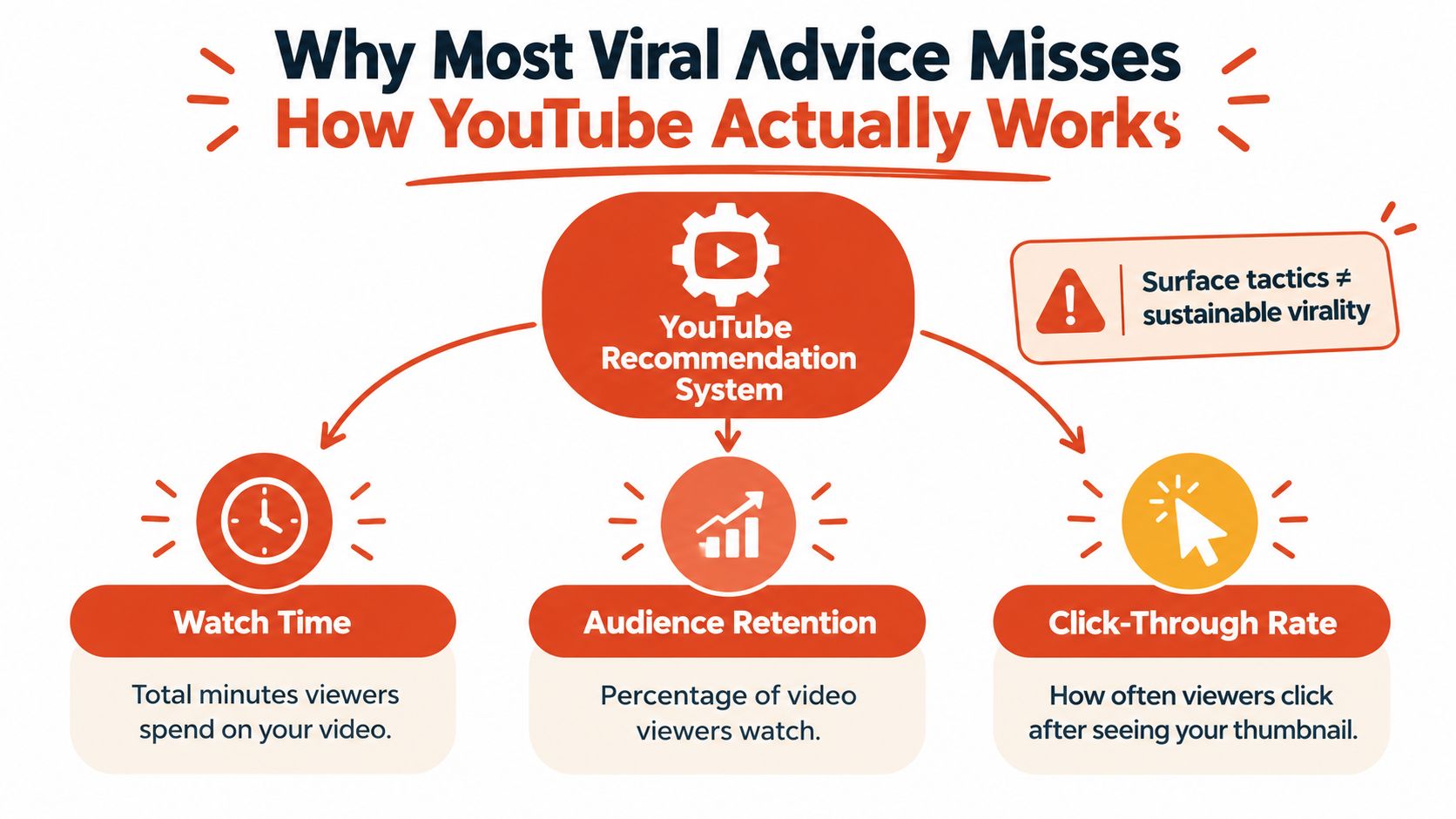
Optimize the experience, not an isolated metric
Watch time isn't interchangeable with satisfaction. A viewer might stay because the explanation is useful, or because the creator keeps delaying an answer. Those experiences shouldn't lead you to the same creative decision.
YouTube's satisfaction signals include viewing behavior and feedback such as likes, dislikes, and survey responses, rather than watch duration alone, as described in this analysis of YouTube's recommendation signals.
A useful working definition of viral potential is a video that repeatedly delivers on its promise for the people most likely to value it.
That isn't a guarantee of broad reach. It's a production standard you can improve, unlike hoping the next upload gets lucky.
Designing the Click That Sets Up the Watch
Before opening a thumbnail editor, finish this sentence: This video is for someone who wants to understand or accomplish… If the answer includes unrelated audiences and outcomes, narrow it.
Treat the title and thumbnail as a paired hypothesis. The title states the value or question. The thumbnail makes the situation visible. Neither should require the other to explain away a misleading claim.
Make the promise concrete
Consider a hypothetical interview about recording better podcast audio. A title such as Fix Hollow Podcast Audio Before You Buy Another Microphone identifies a problem and a useful outcome. A thumbnail showing the recording setup and the troublesome room can add information.
This Changes Everything paired with an exaggerated reaction face gives the viewer far less reason to expect a relevant answer. It might create curiosity, but curiosity without direction makes it harder to deliver the expected experience.
Use these checks before publishing:
- Lead with meaning. Put the important topic words early rather than burying them behind a vague setup.
- Keep the image legible. Choose a clear subject, readable text, and restrained composition.
- Add information. Don't spend the thumbnail repeating the entire title.
- Verify the claim. If the video only discusses an approach, don't package it as a demonstrated result.
This comparison is a useful pre-publication check.
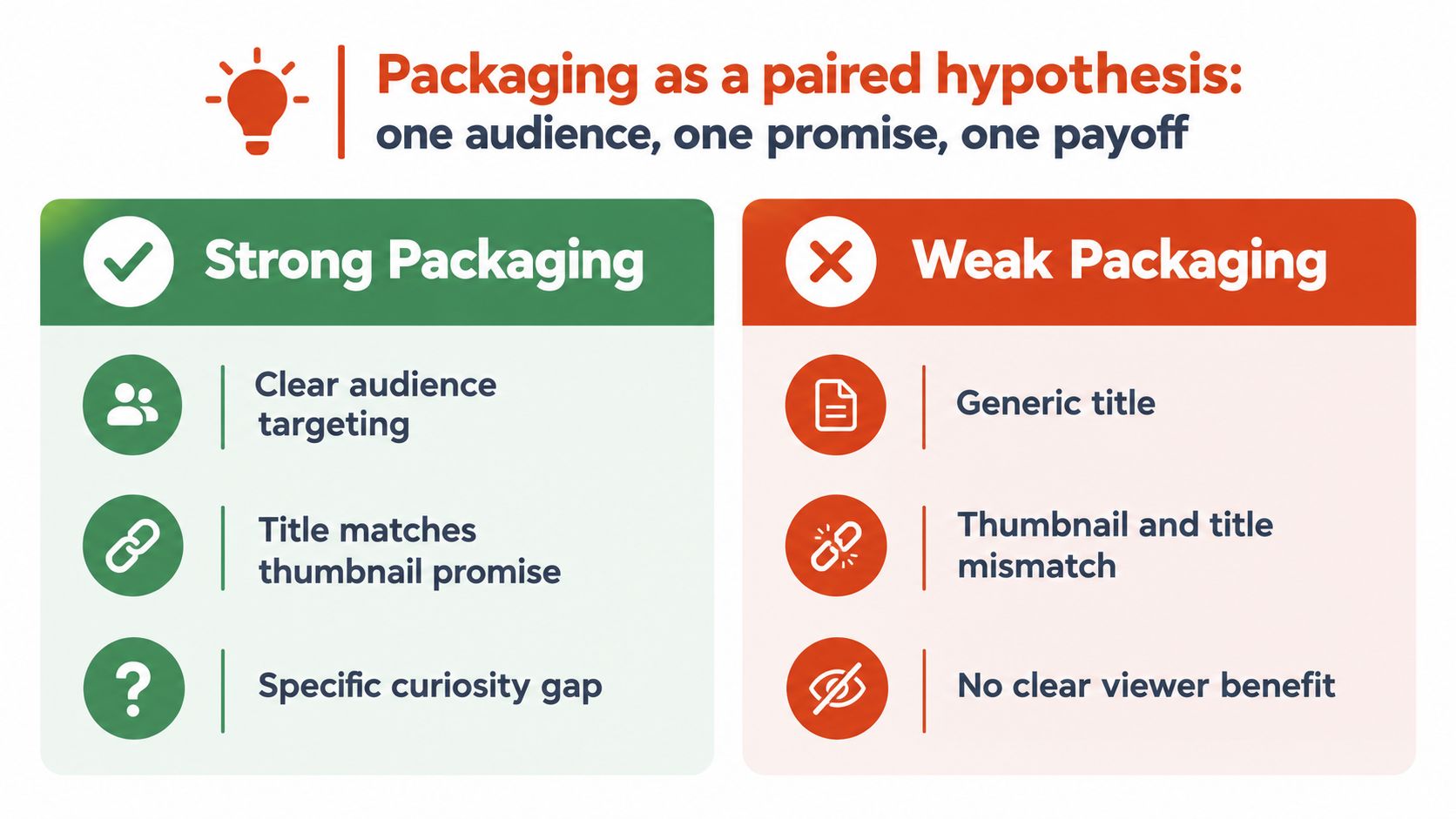
Test without destroying the diagnosis
YouTube recommends evaluating Home and Suggested click-through rate during the first 24 hours, particularly for videos receiving above-average impressions, in its title and thumbnail guidance. Treat that as a review window, not a deadline for declaring success or failure.
Compare impressions with clicks before changing anything. Then inspect whether the people who clicked stayed long enough to receive the promised value. More clicks aren't an improvement if the new packaging attracts viewers who immediately discover the video isn't for them.
When testing sequentially, change the title or the thumbnail, not both. Keep a record of the change and remember that audience differences can make comparisons imperfect. A shortlist of AI tools for YouTubers can support production, but decide what you're testing before generating variants.
Writing the Opening 30 Seconds Before You Press Record
Write the opening before filming the rest. It's much easier to discover that your premise needs clarification in a document than after you've recorded an interview or demonstration.
Keep the thumbnail claim, title promise, and opening together on the same page. Read them in sequence. They should sound like different parts of the same idea, not competing attempts to grab attention.
A simple planning page is enough to expose a mismatch.
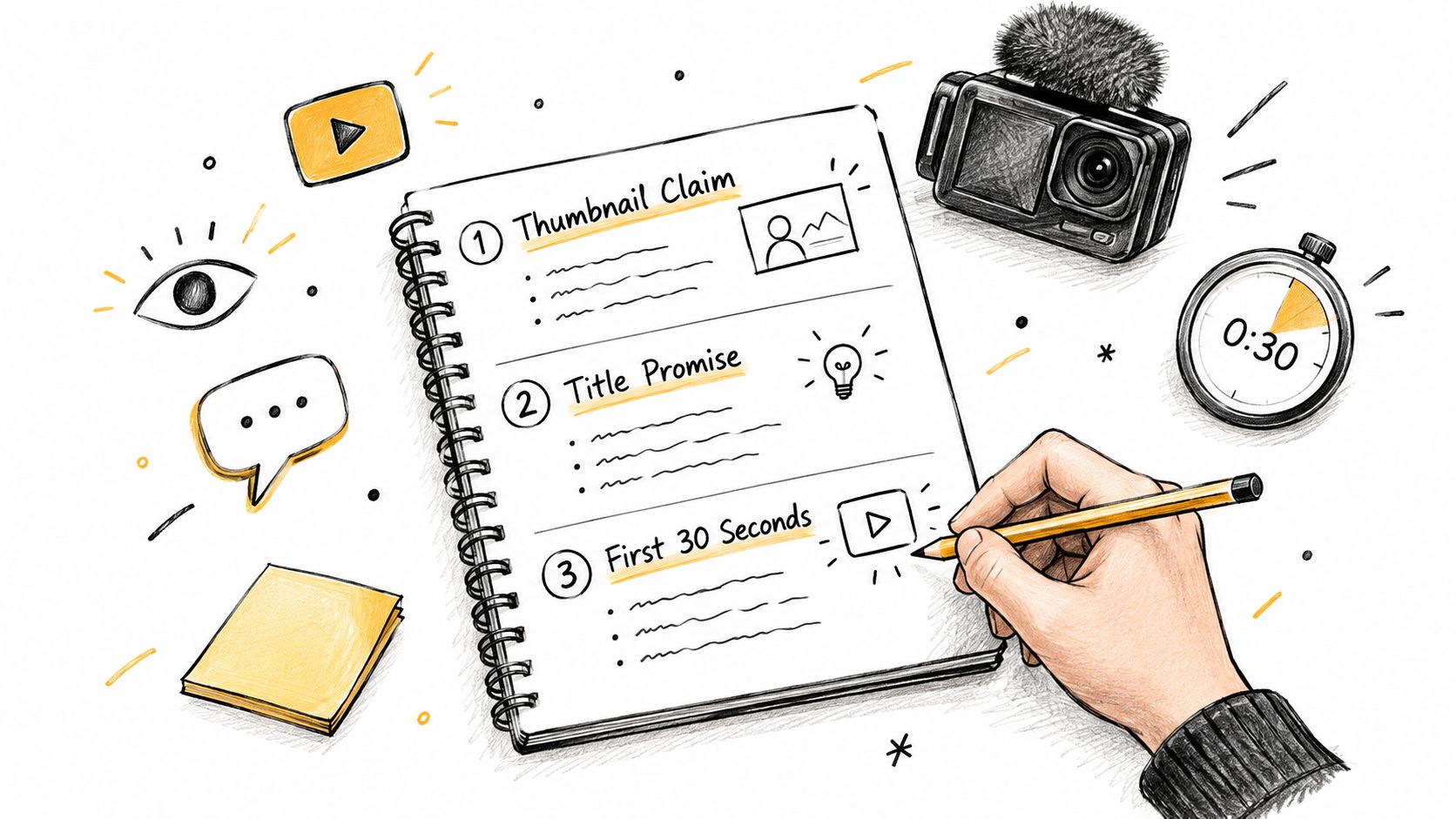
Show the reason to watch
For the hypothetical audio video, begin with the problem the viewer can hear. Play the hollow recording, contrast it with the corrected version, then explain what you're going to inspect. That provides a reason to care before you introduce equipment or background.
A practical opening should establish:
- The situation. Show the result, tension, or problem rather than talking around it.
- The value. Make clear what the viewer will understand by watching.
- The evidence. Include something observable that supports the promise, such as a comparison or demonstration.
Greetings and branding aren't forbidden. They just shouldn't delay the reason someone clicked. Likewise, a surprising statement isn't automatically a strong hook if the video can't substantiate it.
Build progression instead of constant interruption
After the opening, arrange the material so each part changes what the viewer understands. For an instructional video, that might mean diagnosis, attempted fix, comparison, and conclusion. For an interview, it might mean a claim, a challenge, supporting experience, and a useful qualification.
Cut repeated points and irrelevant tangents. Keep pauses that help an explanation land. Rapid cuts can create activity while making a difficult idea harder to follow.
During review, examine the first 30 seconds and specific retention timestamps, using the diagnostic approach described in this audience-retention guide. An early cliff suggests checking expectation matching; repeated dips suggest reviewing particular passages; rewatch spikes identify moments worth examining more closely.
A spike isn't automatically praise. The viewer may have replayed a useful demonstration or struggled to understand it. Watch the corresponding footage before deciding what to repeat.
Editing and Shorts Workflow That Produces Testable Clips
A long recording isn't automatically a collection of good Shorts. Some excellent interview passages depend on a question, an earlier definition, or a story the audience has already heard. Extracting only the exciting sentence can remove what makes it meaningful.
The opportunity is substantial: YouTube reported 30 billion daily Shorts views and 1.5 billion monthly logged-in users in July 2022 in its report on Shorts and the artist journey. Those are historical scale markers, not a current reach forecast or a promise for your clips.
Use a workflow that separates finding candidates from polishing them.
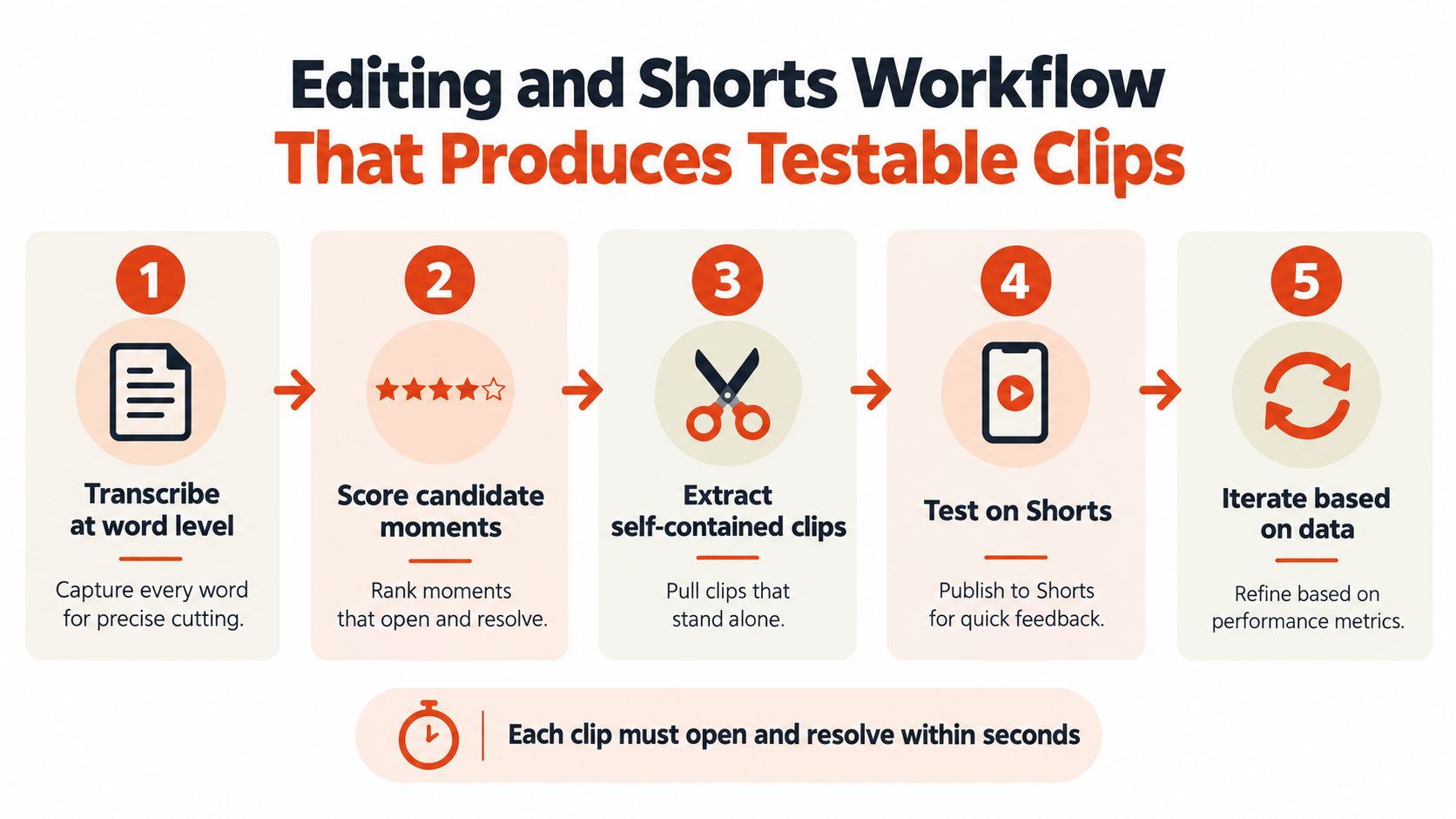
Select from the transcript, then verify in the footage
Start with a word-level transcript and speaker labels. Search for problems, decisions, objections, demonstrations, and completed stories instead of manually scrubbing the entire recording for energetic moments.
Score candidates for narrative completeness. Does the opening identify the subject? Does the passage contain something worth learning or experiencing? Does the ending resolve the idea?
Reject passages that begin with unexplained references such as “that's why it failed.” Either restore the missing context or choose another segment. A compelling sentence isn't necessarily a usable clip.
Context test: Play the candidate for someone who hasn't seen the source. If they need a separate explanation, the cut isn't finished.
Automatic candidate selection can shorten the search, but editorial review still matters. Check whether the excerpt preserves qualifications and accurately represents what the speaker meant.
Finish the edit without damaging the meaning
Snap cuts to word and sentence boundaries, then listen for chopped syllables and missing breaths. Remove dead space selectively rather than compressing every pause.
For vertical framing, keep the active speaker visible without unnecessary crop movement. Style captions for readability, check names and technical terms, and preview whether text obscures a demonstration. Export vertical, square, and wide-screen versions from the same approved narrative, then inspect each crop rather than assuming every composition survives reframing.
Use this embedded video alongside your editing review.
For a broader selection process, use this guide to creating a highlight video. Keep a simple record of each candidate's premise, opening, and ending. That lets you compare deliberate variants instead of treating every export as a separate creative guess.
Reading Analytics Like a Decision Maker, Not a Fan
Opening Analytics to admire the view counter doesn't tell you what to edit next. Start with a decision: whether to revise packaging, rebuild an opening, shorten a passage, or make a follow-up.
Use a metric-to-action mapping so each observation leads to an investigation rather than an emotional verdict.
| Metric | What It Signals | Next Action |
|---|---|---|
| Impressions and click-through rate | How the packaging performs with the audience receiving it | Check relevance and clarity before revising the title or thumbnail |
| Opening retention | Whether the beginning meets the expectation created before the click | Watch the opening beside the packaging and locate the mismatch |
| Average view duration | How long viewers stay across the complete experience | Inspect structure and payoff rather than shortening automatically |
| Retention dips | Where viewers leave or skip | Review the exact passage for repetition, confusion, or irrelevant context |
| Rewatch behavior | A moment viewers revisit | Determine whether it was valuable, surprising, or difficult to understand |
| Comments and returning viewers | Qualitative usefulness and continued audience interest | Identify follow-up topics and check whether viewers return for them |
Interpret patterns, not verdicts
Suppose a hypothetical clip earns enthusiastic comments about its practical explanation, but viewers repeatedly leave during a long setup. The useful decision isn't to abandon the topic. It's to preserve the explanation while finding a more direct entrance.
The opposite can happen too. A dramatic opening may hold attention while comments reveal that viewers misunderstood the conclusion. Better editing might require more context, even if that makes the clip less aggressive.
Don't treat comments as a representative survey or returning-viewer counts as proof that a particular Short caused growth. Satisfaction is something you infer from several signals, not a complete score available in a single dashboard.
Keep a weekly decision log
- Record the observation. Note the timestamp, audience context, or recurring viewer question.
- Name the likely cause. Separate what you observed from what you're assuming.
- Choose the next test. Make the change specific enough that its outcome will teach you something.
Compare uploads with similar purposes and formats where possible. A concise answer and a long interview ask different things of viewers, so an isolated retention percentage isn't a useful universal target.
Turning a Viral Short Into Real Channel Growth
Consider a hypothetical podcast interview about negotiating freelance contracts. The full conversation covers pricing, scope, and difficult client requests. A promising Short contains a complete explanation of why an apparently small revision can change the project.
The wrong approach is to cut before the explanation and tell viewers to watch the episode for the answer. That creates a trailer, not a satisfying standalone clip. The stronger version delivers the insight, then points toward the broader discussion of handling scope changes.
Design the destination before publishing
Choose the longer video before you finalize the Short. Check that its title and opening clearly connect to the question the clip raises. Sending viewers to a loosely related episode makes the next step harder to justify.
Shorts work differently from conventional videos because viewers encounter them in a swipe-based, personalized feed, as described in Hootsuite's explanation of YouTube's algorithm. Don't assume that attention in that setting automatically becomes interest in a long conversation.
Make the connection explicit:
- Before the clip. Remove references that only existing subscribers would understand.
- After the payoff. Offer a relevant continuation, such as the full discussion of responding to client requests.
- At the destination. Ensure the longer video actually provides that continuation.
The Short should answer its own question. The longer video should answer the next useful question.
Measure the handoff carefully
Use relevant navigation options available in your publishing setup rather than relying on a generic request to subscribe. Don't assume pinned comments or end screens behave identically across Shorts and long-form viewing.
After publication, inspect whatever referral and audience-overlap information your Analytics provides. Look for evidence that viewers continue into the intended content, but don't claim attribution when the data can't establish it.
A consistent topic and destination make that investigation more useful. If the channel still lacks a clear audience promise, refine it with this guide to building a YouTube channel before chasing unrelated discovery traffic.
Your 14-Day Plan to Ship and Improve a Viral-Style Video
Use the next two weeks as a production cycle, not a deadline for going viral. The deliverable is a published video, a set of usable clips, and a record of what you'll change next.
Week one builds the material
Choose a specific viewer problem and a recording that can address it. Draft the packaging and opening together, then check that the footage supports the claim before spending time polishing graphics.
Work through this checklist:
- Define the promise. State the outcome in plain language and remove unsupported exaggeration.
- Prepare the opening. Choose the demonstration, tension, or evidence that establishes relevance.
- Select clip candidates. Review transcript-led suggestions and keep only passages with sufficient context.
- Approve the exports. Check sentence boundaries, captions, framing, and the ending on a phone-sized preview.
Keep rejected candidates with a short explanation. “Needs earlier context” is a useful production note; “not viral enough” isn't.
Week two produces decisions
Publish the main video and stage the clips so you can review them deliberately. Run the initial packaging check described earlier, then inspect the relevant retention passages before making changes.
Maintain a short log:
- What happened. Record the observable pattern without inventing an explanation.
- What changed. Identify the packaging or editing variable you adjusted.
- What comes next. Decide whether to revise, create a follow-up, or retire the candidate.
Finish by checking the destination you offered Short viewers. If the continuation doesn't match their interest, revise the handoff before producing more clips.
You can't schedule virality. You can schedule the work that makes each upload a better-informed attempt: a defensible promise, a coherent edit, and a clear decision after publication.
Keptbits turns long recordings into scored, self-contained clip candidates with word-level captions and speaker-aware framing. Bring an interview, webinar, or stream, review the suggested moments, and use the finished clips to test which promises and payoffs resonate with your viewers.
Keptbits cuts on sentence boundaries.
Paste a link or upload an episode, say how many clips you want, and get them back captioned and vertical. The free plan needs no card.
Start freeRead next
7 Online Video Editor Free Picks That Deliver in 2026
Compare 7 online video editor free options for 2026, including watermark limits, export quality, key features, and the best use for each tool.
How to Make YouTube Channel Setup That Actually Grows
Learn how to make YouTube channel setup that grows: account, branding, first videos, optimization, and monetization milestones explained step by step.
How to Create a Highlight Video That Actually Works
Learn how to create a highlight video with a step-by-step workflow covering scripting, clipping, pacing, captions, and export settings that perform.