15 October 2026 · 14 min read
How Do I Make a Book Trailer That Actually Sells
Learn how do i make a book trailer that hooks readers and drives sales, with scripting, visuals, music, captions, and distribution tips.
The most common advice about book trailers gets the first part wrong. A trailer is not a tiny movie, and it's not a polished summary of the whole book, either. It's a short, suspense-building advertisement built to create the right expectation, then push the right reader toward the next step.
That matters because trailers can help people decide whether to buy, borrow, or read, but they can also turn the wrong viewer off completely. In one academic study of young-adult book trailers, nearly half of participants said they had no desire to read the book after watching. The practical answer isn't to make one grand, expensive cut and hope for the best. It's to make three or more testable versions that share one promise but vary by hook, length, and framing.
Table of Contents
- Why One Trailer Is Never Enough
- Writing the Promise and the Script
- Adapting the Trailer for Vertical, Square, and Horizontal
- Music, Voiceover, and Silent Viewing
- Captions, Contrast, and the Silent-Viewing Checklist
- Rights, Stock, and a Safe Paper Trail
- Where to Publish and What to Measure
Why One Trailer Is Never Enough
A single trailer assumes every platform rewards the same pacing, the same framing, and the same attention span. That's rarely true in practice. A vertical feed, a search-driven video page, and a silent autoplay placement each punish different mistakes, so one export can't carry all of them well.
The better unit of work is a small portfolio. Start with one master concept, then break it into versions that can be judged separately. That's not overkill, it's the cheapest way to find out whether your premise lands before you spend more time polishing the wrong cut.
Practical rule: make the message first, then fit the format.
Book trailers have existed as a distinct promotional format since the early 2000s, and the format expanded when user-generated video platforms made distribution easier. That history still shapes what works now, because a trailer has to travel across shareable platforms, searchable titles, and mobile screens, not just look cinematic in isolation (Readers Lane).
A good trailer can influence interest, but the expectation it sets matters more than the visuals alone. The warning from the research is simple, if your trailer suggests the wrong genre or emotional promise, you may gain views and lose readers at the same time (VT ALAN study). That's why the first job is to define the promise in one sentence, then test it in multiple cuts.
Writing the Promise and the Script
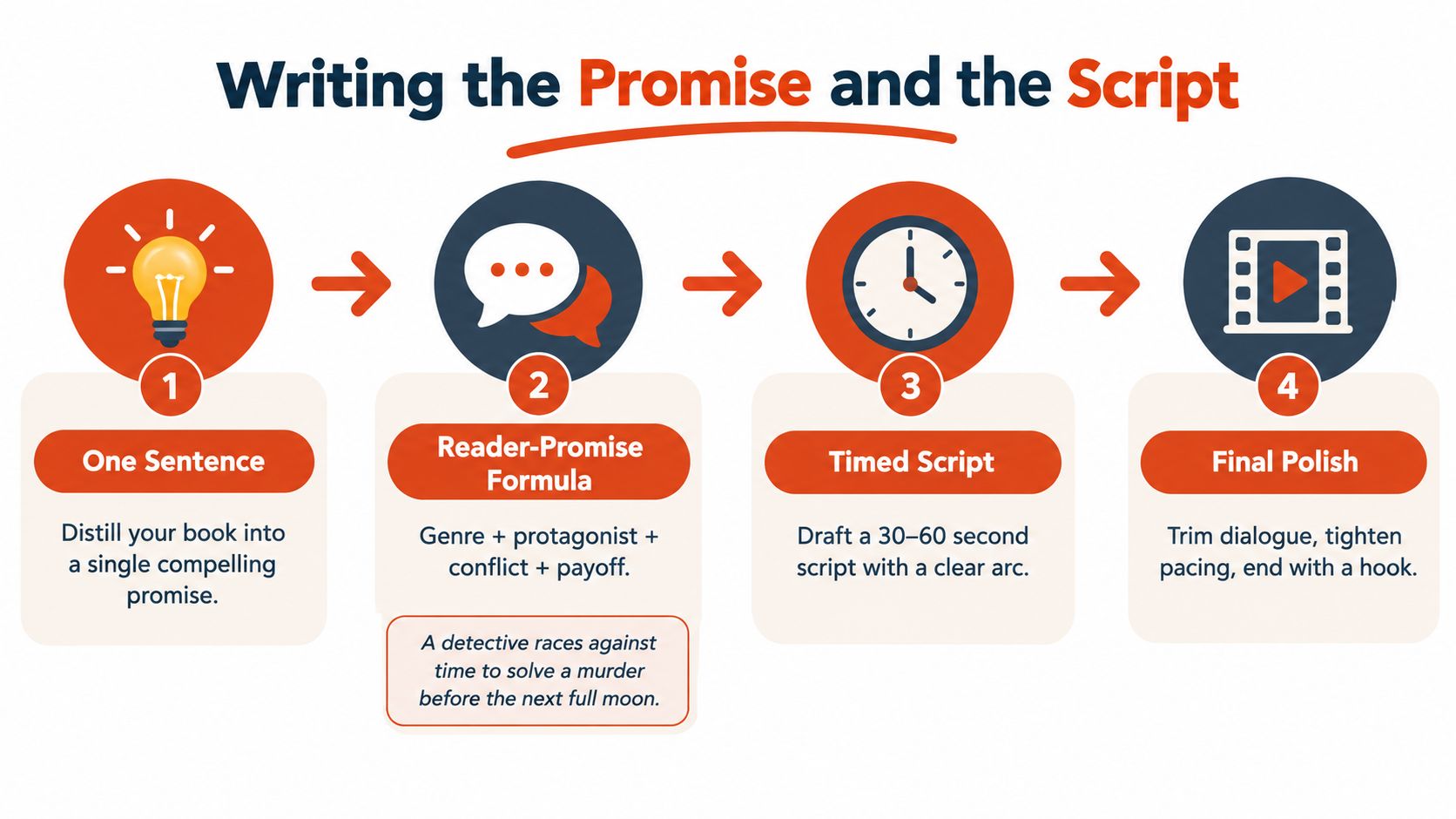
Start with one sentence
A trailer that starts with mood often drifts. Start with the promise instead. Write one sentence that names the genre, protagonist, conflict, and payoff. For a mystery, that can be, “A detective races against time to solve a murder before the next full moon.” For romance, the promise is emotional tension and withheld connection. For nonfiction, it is the change, insight, or result the reader wants.
That sentence becomes the filter for every shot, caption, and sound cue. If a scene does not support the promise, cut it. If a line points to a different genre, remove it even when it sounds polished on the page.
Time the words to the edit
A strong 60-second master script usually sits around 120 to 130 spoken words, while text-only cards need roughly 60 to 75 words to stay readable. Keep the opening fast. My cut order is simple: 0 to 3 seconds for the hook, 3 to 10 seconds for the central question, 10 to 22 seconds for rising stakes, 22 to 45 seconds for atmosphere and selective evidence, then 5 to 10 seconds for title, author, publication status, and the call to action. That pacing map is a working script discipline, not a law, but it keeps the trailer from wandering before the premise lands.
BookReelz recommends a similar tight structure for video promotion, which matches what usually performs better in practice on social feeds (BookReelz).
The point is not to make the cut feel rigid. It is to stop the opening from eating its own momentum. Viewers decide fast whether a trailer feels like their kind of book, so the premise has to appear almost immediately.
Keep the curiosity intact
Spoilers kill trailers. The viewer needs the setup and the stakes, but not the answer. Leave out the ending, keep the middle lean, and skip backstory that only matters after someone has read the book.
A practical check helps here. If the script gives away the book's core turn, it is too generous. If it hides the genre, it is too vague. The right version leaves one clean reason to keep watching, then one clear reason to click through.
Adapting the Trailer for Vertical, Square, and Horizontal
A trailer that works in one frame can break in another. Text that reads cleanly on a desktop timeline may shrink into noise on a phone. A crop that feels cinematic in one export can bury the cover or push the hook off-center in another. The practical split is simple: treat the tool as mechanical support. The strategy stays the message, and only the frame changes.
| Element | 9:16 Vertical | 1:1 Square | 16:9 Horizontal |
|---|---|---|---|
| Hook placement | Put the premise high and large, visible at first glance | Keep the hook centered with extra margin around text | Allow a wider visual setup before the title appears |
| Text size | Use the biggest readable type, especially for the opening line | Use safer margins so UI doesn't crowd the edges | You can run slightly more text, but keep it sparse |
| Pacing | Faster cuts, tighter scenes, less visual clutter | Moderate pacing with centered composition | More room for atmosphere and scene context |
| Cover placement | Keep the cover large and clear, but not buried under UI | Center it or anchor it with balanced spacing | Place it where it won't compete with wide imagery |
| Best use | TikTok, Reels, Shorts | Feed posts and repostable social cuts | YouTube, author site, embedded trailers |
If you only make one export, the trailer gets stuck serving the least forgiving platform. Build one master script, then cut it into 15-, 30-, and 45-second variants. Keep the 15-second version focused on the premise, the 30-second version on premise plus conflict, and the 45-second or longer cut on atmosphere and proof points.
Do not trim the same timeline blindly. A shortened edit often loses the opening shape that made the original work. When each version stands on its own, the response tells you more clearly what holds attention.
A trailer is a set of controlled edits that share one promise and compete on clarity.
For a practical editing workflow, tools that support vertical reframing and multi-aspect output can save a lot of mechanical work, especially if you are repurposing the same material across feeds like the ones discussed at this vertical video editing guide. The tool helps with the cut, the crop, and the export, but the message still has to survive each format on its own.
Music, Voiceover, and Silent Viewing
Sound can help a trailer feel like the right genre in the first second, but it can also overpower the message if you lean on it too hard. Use music as a signal, not a crutch. A moody ambient bed suits tension, lighter acoustic phrasing fits gentler material, and pulsing rhythm works when the book promise is urgent. The wrong track makes even solid visuals feel off-brand.
Voiceover is most useful when the book needs a human guide through a complex premise. Text-only cards work better when the goal is speed and legibility. A voiceover-heavy edit should still survive without sound, because a lot of social viewing happens muted. That means the script, typography, and pacing all need to carry the trailer on their own.
The mute test
Strip the audio and play the timeline once. If the viewer can't tell what kind of book this is, what's at stake, and where to go next, the trailer isn't ready. The hook has to read visually, not just sound persuasive.
Cut on action instead of waiting for breaths or musical phrases to finish. That keeps momentum moving even when the soundtrack is subtle. Use sound effects sparingly, mainly to add texture or punctuate a turn, not to create fake intensity.
If you're using any automated editing support, treat it as a starting point, not a final draft. Tools that accelerate repurposing can be useful, but the final pass still needs a human check for rhythm, clarity, and tone. A good reference for that kind of workflow is this overview of AI content creation tools, especially if you're trying to keep production efficient without letting the edit feel generic.
The best trailers sound like the book. They don't sound like stock suspense with a title card at the end.
Captions, Contrast, and the Silent-Viewing Checklist
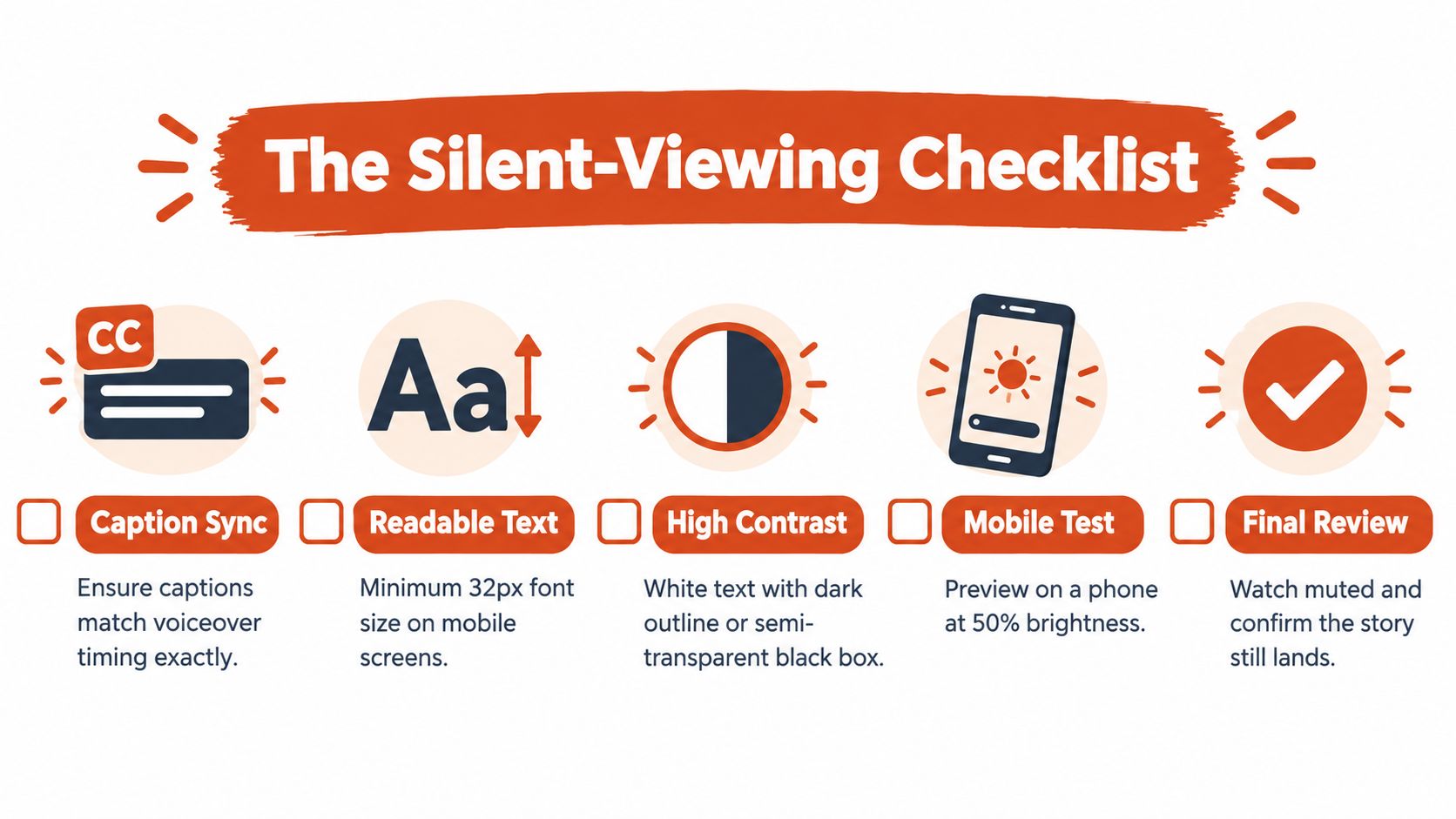
Accessibility isn't a decorative add-on. It's part of whether the trailer can be understood at all. A clear text-first premise lets a viewer grasp genre and emotional promise even if autoplay is muted, and captioning keeps the meaning intact when voiceover is used.
Pre-export checklist
- Caption sync: match captions to the voiceover timing exactly, so spoken and written words don't drift apart.
- Readable text: keep type large enough to survive phone screens and fast scrolling.
- Contrast: use high contrast, like white text with a dark outline or a translucent black box behind it.
- Safe areas: keep critical text away from the edges so UI doesn't crop it in vertical or square layouts.
- Silent review: watch the whole trailer with the sound off and confirm the story still lands.
A captioned trailer can still feel stylish. The trick is to place the text where the eye can find it fast, then hold it long enough to be read without rushing. That becomes more important when the trailer carries more than one idea per frame.
The goal isn't just compliance. It's comprehension. If a viewer can follow the premise in silence, the trailer earns a better chance of converting that attention into curiosity.
For teams that want to automate part of that workflow, caption generation can speed up the first pass, as long as someone still checks timing and readability before export. A useful starting point is this auto-caption generator guide, then a final human pass on the result.
Rights, Stock, and a Safe Paper Trail
Most trailers fail for creative reasons, but a surprising number run into rights problems that could've been avoided early. “Free” stock often isn't free for paid promotion, and editorial use is not the same as commercial use. Fonts, music, cover assets, voice recordings, and even background images need a quick rights check before they go into a trailer you plan to promote.
The practical risk comes from being casual with borrowed material. A recognizable song riff can create licensing trouble. A celebrity likeness can create a publicity issue. A distinctive location, photograph, or book-cover element may have usage limits that don't show up until after the trailer is already built.
Keep a simple rights log
Use a basic record for every asset:
- Asset name
- Source
- License type
- Expiry or usage limit
- Attribution requirement
- Commercial use allowed or not
That log doesn't need to be fancy. It just needs to tell you, before export, whether every element can legally appear in the trailer and in the places you plan to publish it. If you're using narration, confirm that the recording rights are clean too, especially if a freelancer, actor, or AI voice tool is involved.
A final rights check should happen after the edit is locked, not while you're still experimenting. That way you don't waste time clearing assets that won't survive the final cut. The safest trailer is the one you can publish without second-guessing what's behind every frame.
Where to Publish and What to Measure
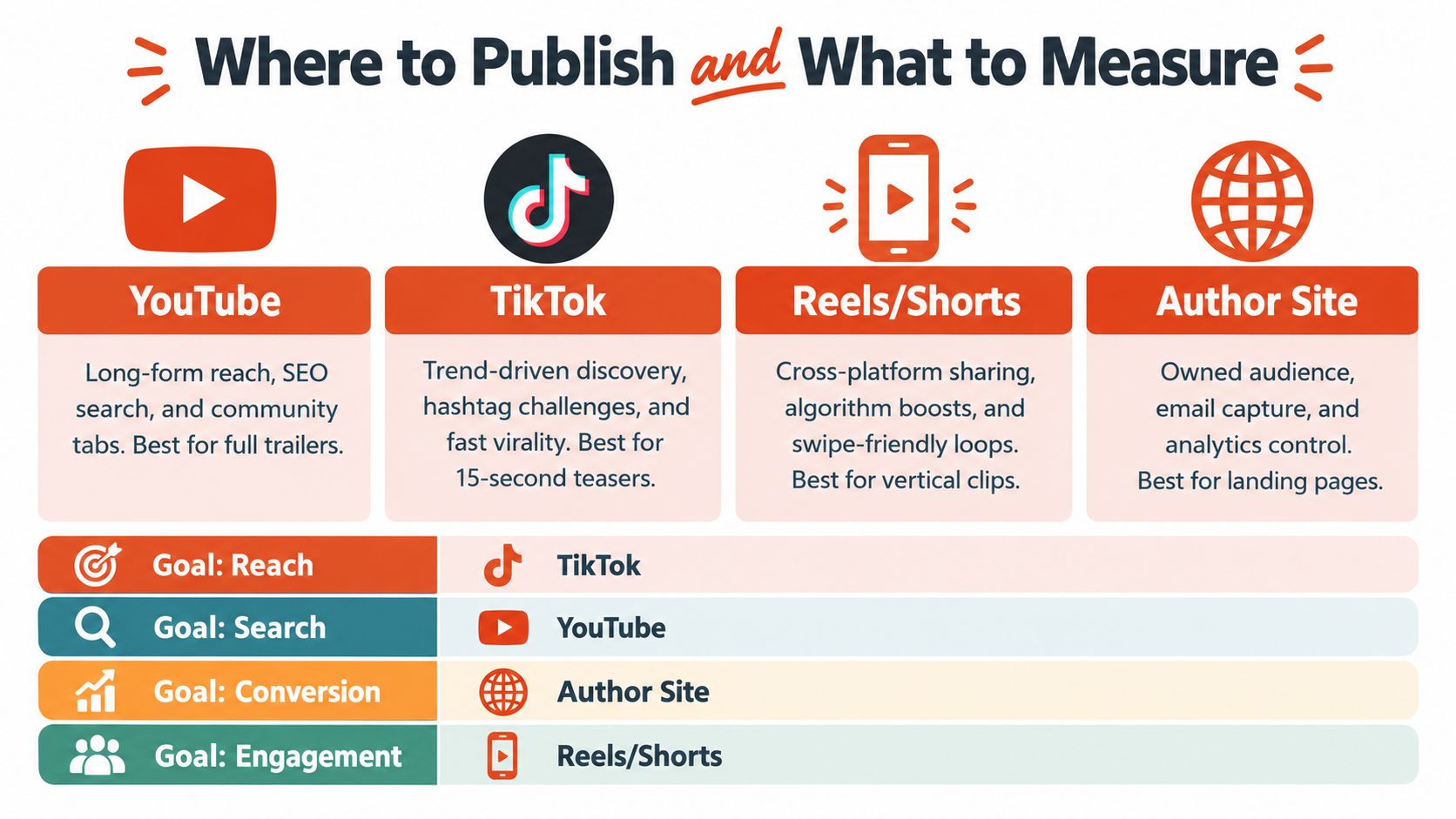
| Platform | Best For | Format Strength | Linking |
|---|---|---|---|
| YouTube | Search, longer viewing, evergreen discovery | Best home for the full trailer and horizontal versions | Strong landing-page and description linking |
| TikTok | Fast discovery and short teaser behavior | Best for 15-second vertical cuts | Linking is limited, so the hook has to do more work |
| Reels | Cross-posted short-form reach | Best for vertical clips and quick loop behavior | Strong for social engagement and profile clicks |
| Author Site | Owned audience and conversion control | Best for the canonical trailer and campaign hub | Best place for tracked links and email capture |
Publishing turns the trailer into a test. Views alone do not tell you much. A clip can draw attention and still fail to move readers if the opening hook is weak, the title is missing, or the call to action is too soft. Measure completion rate, average watch time, shares, saves, landing-page clicks, email sign-ups, sample downloads, and attributable sales instead of staring at views in isolation.
A dedicated landing page makes the whole effort more useful. Add campaign-specific UTM parameters, use one call to action, and record the baseline before release so you can compare what changed after the trailer went live. That is the difference between “the video got attention” and “the video produced incremental lift.”
The purchase numbers are mixed, which is exactly why the tracking matters. eBookPBook reported that 15.5% of respondents bought a book solely because of a trailer, while about 45% said the trailer partly influenced the purchase, usually when they were already considering the book. The trailer is usually a nudge that tips a reader who was already considering the book, so judge it on incremental lift rather than standalone sales.
A practical launch sequence
- Ship the 9:16 15-second premise cut first, because that is the cleanest hook test.
- Ship the 9:16 30-second conflict cut next, because it shows whether the stakes are strong enough to hold attention.
- Ship the 16:9 60-second atmosphere cut for YouTube and your site, because it gives search and embedded viewing a fuller version of the message.
Then review the weak points, not just the overall numbers. If completion rate drops at the opening, recut the hook. If viewers watch but do not click, sharpen the final frame. If the cover is hard to read on mobile, fix the composition before spending more on promotion.
What to optimize first: the first three seconds, the title frame, and the final action step.
The recut loop is where most trailers improve. Test a few opening hooks, compare cost per click and downstream actions, then scale the version that produces the best attributable response. If one edit looks polished but does not move people forward, it is not the winner.
For the first round, keep your expectations grounded. A book trailer is not a magic wand, and it does not need to be. It needs to be clear, readable, legally safe, and built to survive the way real readers encounter video.
Keptbits cuts on sentence boundaries.
Paste a link or upload an episode, say how many clips you want, and get them back captioned and vertical. The free plan needs no card.
Start freeRead next
7 Online Video Editor Free Picks That Deliver in 2026
Compare 7 online video editor free options for 2026, including watermark limits, export quality, key features, and the best use for each tool.
How to Make Viral Video on YouTube in 2026
Learn how to make viral video on YouTube with proven hooks, thumbnail tests, retention fixes, and Shorts workflows that actually convert viewers into
How to Make YouTube Channel Setup That Actually Grows
Learn how to make YouTube channel setup that grows: account, branding, first videos, optimization, and monetization milestones explained step by step.